A powerful media converter for your needs
Converting audio and video files from one format to another is not an uncommon practice these days. In fact, being able to convert media files is starting to become a necessity because there are dozens of devices and media playing software out there, and you’ll never know when a media file will end up not being supported by the devices that you have. However, there are also so many software for converting media files out there, so how do you determine what’s the best software to get? Everybody’s preferences are different, of course, but Convertidor MP3 by Convertidor de Videos is a pretty good software that should be considered by everyone.
Top Recommended Alternative

Easy Install and Interface
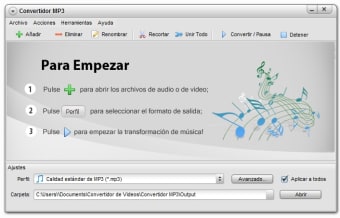
Before we get into the nitty-gritty of this software’s functions, it should be noted that it is pretty quick and easy to install. It downloaded and installed without any complications at all. The interface also reflects the simplicity of the program. At the top is a bar with all of the most important task buttons. Below that bar is a window where you can add files that can be converted. What’s great about this window is that before you add any files, it displays instructions and helpful tips on how to use the program. The final section of the interface is the Output Settings. In this section, users will be able to change the profile output and output folder of the media files to be converted. Users can even choose more advanced options when selecting the output details.
Powerful Features
One of the most essential features of any converter is being able to support and open a wide variety of file types/ After all, how can a software convert a file if it can’t even open that very file type? Thankfully, Convertidor MP3 can support a lot of file types and it can convert to just as many file types as well. The most popular and regularly used file types like .mp4, .mp3, .avi, and more are supported, so the user can rest assured that they’ll be able to convert these media files.
Convertidor MP3 also has several additional features that will probably be of some use to people. One such feature is the trim feature which allows users to reduce the length of the clips that they’re going to convert. Another is the join all feature which is more commonly known as the merge feature. It allows users to combine several clips together when converting media files. A more advanced, but no less useful feature is the ability to limit the number of processors the machine can use. This allows the computer to multitask and not limit itself to the converting process.
Good Converter Overall
Convertidor MP3 is a pretty good converter when all factors are considered. There may not be as many options to customize the software and the interface, but it doesn’t shy away from providing the user with enough choices when it comes to the output. If you’re in need of a solid converter, Convertidor MP3 is a good choice.